
1.7.1 Data Screen
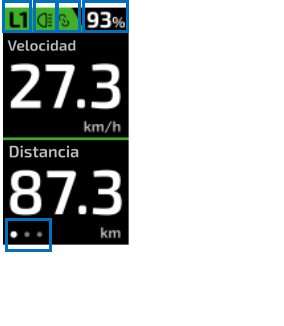
On the Head Unit+ screen we can view a series of data, some fixed and others configurable from the MySmartbike app:
Field 1: shows the assistance level currently selected by the user. |
Field 2: shows whether the system lights are on (icon displayed) or off (empty). |
Field 3: shows that the MySmartbike app is connected to the system. |
Field 4: shows the battery percentage. |
| Field 5: shows the number of different screens configured on the Head Unit+, which the user can navigate using the TRIO or the central button of the Head Unit+. |
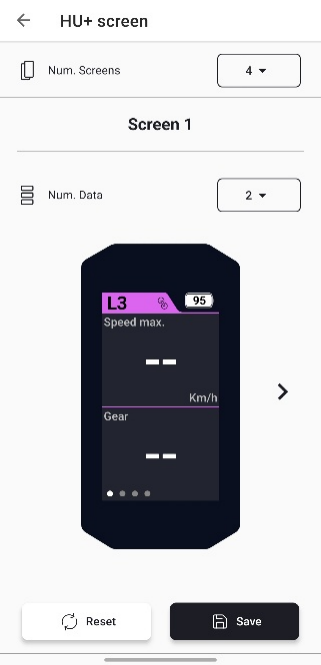
From the MySmartbike app you can configure:
The number of screens displayed on the Head Unit+ (1–4).
The number of fields per screen (1–3).
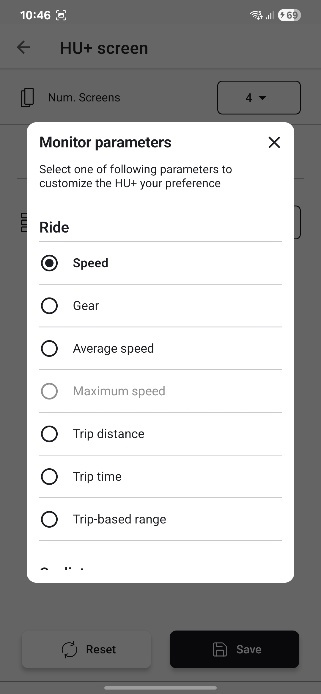
Which data is shown in each field.
1.7.2 Configuration Menu
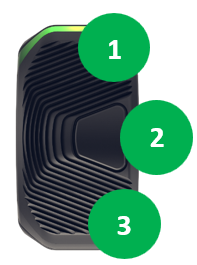
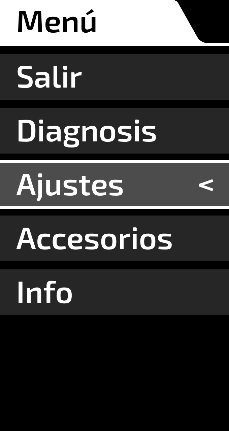
To access the bike customization menu, press and hold buttons 1 and 3 on the TRIO with the eBike stopped.
Navigation: use buttons 1 and 3 to move, and button 2 to confirm entering or exiting a menu. If no activity is detected for one minute, the system returns to the previous screen.
Available menus and submenus:
Diagnosis: check if the system has any error or alert.
Settings: configure/personalize system features.
Accessories: view data about accessories connected to the system.
Information: view information about system components.
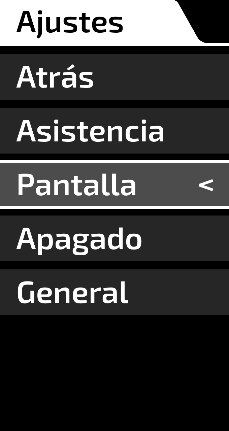
Within Settings, you can access:
Assistance: configure different assistance parameters.
Display: enable/disable automatic brightness control.
Shutdown: enable/disable automatic shutdown, configure its timing, and enable/disable summary screen at shutdown.
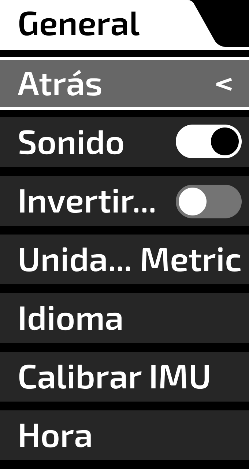
General: change general system settings.
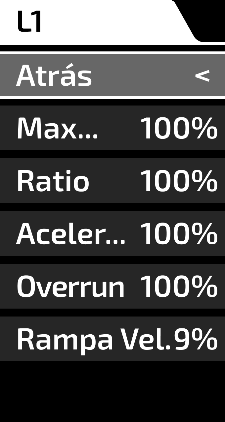
Assistance parameters available:
Motor maps: configure parameters for each assistance level, percentage applied to default values:
Maximum power (0–150%), L3 (0–100%).
Assistance ratio (0–150%).
Acceleration (0–150%).
Overrun (duration 0–100%).
Speed cut-off (smooth or abrupt, 0–100%).


| Cookie | Duration | Description |
|---|---|---|
| cookielawinfo-checkbox-advertisement | 1 year | Set by the GDPR Cookie Consent plugin, this cookie is used to record the user consent for the cookies in the "Advertisement" category . |
| cookielawinfo-checkbox-analytics | 1 year | Set by the GDPR Cookie Consent plugin, this cookie is used to record the user consent for the cookies in the "Analytics" category . |
| cookielawinfo-checkbox-functional | 1 year | The cookie is set by the GDPR Cookie Consent plugin to record the user consent for the cookies in the category "Functional". |
| cookielawinfo-checkbox-necessary | 1 year | Set by the GDPR Cookie Consent plugin, this cookie is used to record the user consent for the cookies in the "Necessary" category . |
| cookielawinfo-checkbox-others | 1 year | Set by the GDPR Cookie Consent plugin, this cookie is used to store the user consent for cookies in the category "Others". |
| cookielawinfo-checkbox-performance | 1 year | Set by the GDPR Cookie Consent plugin, this cookie is used to store the user consent for cookies in the category "Performance". |
| CookieLawInfoConsent | 1 year | CookieYes sets this cookie to record the default button state of the corresponding category and the status of CCPA. It works only in coordination with the primary cookie. |
| elementor | never | This cookie is used by the website's WordPress theme. It allows the website owner to implement or change the website's content in real-time. |
| m | 1 year 1 month 4 days | Stripe sets this cookie for fraud prevention purposes. It identifies the device used to access the website, allowing the website to be formatted accordingly. |
| PHPSESSID | 3 months | This cookie is native to PHP applications. The cookie stores and identifies a user's unique session ID to manage user sessions on the website. The cookie is a session cookie and will be deleted when all the browser windows are closed. |
| rc::a | never | This cookie is set by the Google recaptcha service to identify bots to protect the website against malicious spam attacks. |
| rc::c | session | This cookie is set by the Google recaptcha service to identify bots to protect the website against malicious spam attacks. |
| uncode_privacy[consent_types] | 1 year | This cookie is set by Uncode WordPress theme and is used to manage privacy settings on the website. |
| viewed_cookie_policy | 1 year | The cookie is set by the GDPR Cookie Consent plugin to store whether or not the user has consented to the use of cookies. It does not store any personal data. |
| Cookie | Duration | Description |
|---|---|---|
| __cf_bm | 30 minutes | This cookie, set by Cloudflare, is used to support Cloudflare Bot Management. |
| wp-wpml_current_language | session | WordPress multilingual plugin sets this cookie to store the current language/language settings. |
| yt-player-headers-readable | never | The yt-player-headers-readable cookie is used by YouTube to store user preferences related to video playback and interface, enhancing the user's viewing experience. |
| yt-remote-cast-available | session | The yt-remote-cast-available cookie is used to store the user's preferences regarding whether casting is available on their YouTube video player. |
| yt-remote-cast-installed | session | The yt-remote-cast-installed cookie is used to store the user's video player preferences using embedded YouTube video. |
| yt-remote-connected-devices | never | YouTube sets this cookie to store the user's video preferences using embedded YouTube videos. |
| yt-remote-device-id | never | YouTube sets this cookie to store the user's video preferences using embedded YouTube videos. |
| yt-remote-fast-check-period | session | The yt-remote-fast-check-period cookie is used by YouTube to store the user's video player preferences for embedded YouTube videos. |
| yt-remote-session-app | session | The yt-remote-session-app cookie is used by YouTube to store user preferences and information about the interface of the embedded YouTube video player. |
| yt-remote-session-name | session | The yt-remote-session-name cookie is used by YouTube to store the user's video player preferences using embedded YouTube video. |
| ytidb::LAST_RESULT_ENTRY_KEY | never | The cookie ytidb::LAST_RESULT_ENTRY_KEY is used by YouTube to store the last search result entry that was clicked by the user. This information is used to improve the user experience by providing more relevant search results in the future. |
| Cookie | Duration | Description |
|---|---|---|
| _fbp | 3 months | Facebook sets this cookie to display advertisements when either on Facebook or on a digital platform powered by Facebook advertising after visiting the website. |
| _ga | 2 years | The _ga cookie, installed by Google Analytics, calculates visitor, session and campaign data and also keeps track of site usage for the site's analytics report. The cookie stores information anonymously and assigns a randomly generated number to recognize unique visitors. |
| _ga_* | 1 year 1 month 4 days | Google Analytics sets this cookie to store and count page views. |
| _ga_JQ110VKQST | 2 years | This cookie is installed by Google Analytics. |
| _ga_XBWEG8WP9K | 2 years | This cookie is installed by Google Analytics. |
| _gcl_au | 3 months | Provided by Google Tag Manager to experiment advertisement efficiency of websites using their services. |
| _gid | 1 day | Installed by Google Analytics, _gid cookie stores information on how visitors use a website, while also creating an analytics report of the website's performance. Some of the data that are collected include the number of visitors, their source, and the pages they visit anonymously. |
| CONSENT | 2 years | YouTube sets this cookie via embedded youtube-videos and registers anonymous statistical data. |
| Cookie | Duration | Description |
|---|---|---|
| fr | 3 months | Facebook sets this cookie to show relevant advertisements by tracking user behaviour across the web, on sites with Facebook pixel or Facebook social plugin. |
| pixelcat_id | 1 year | Pixel Cat plugin sets this cookie to make Facebook advertisements. |
| test_cookie | 15 minutes | doubleclick.net sets this cookie to determine if the user's browser supports cookies. |
| VISITOR_INFO1_LIVE | 5 months 27 days | A cookie set by YouTube to measure bandwidth that determines whether the user gets the new or old player interface. |
| VISITOR_PRIVACY_METADATA | 6 months | YouTube sets this cookie to store the user's cookie consent state for the current domain. |
| YSC | session | YSC cookie is set by Youtube and is used to track the views of embedded videos on Youtube pages. |
| yt.innertube::nextId | never | YouTube sets this cookie to register a unique ID to store data on what videos from YouTube the user has seen. |
| yt.innertube::requests | never | YouTube sets this cookie to register a unique ID to store data on what videos from YouTube the user has seen. |
| Cookie | Duration | Description |
|---|---|---|
| _cfuvid | session | Description is currently not available. |
| _dc_gtm_UA-70306743-1 | 1 minute | No description |
| ip2location_redirection_first_visit | 1 day | No description available. |
| pbid | 6 months | Description is currently not available. |
| wc_postfinancecheckout_device_id | 1 year | No description available. |
| woocommerce_recently_viewed | session | WooCommerce sets this cookie to store performed actions on the website. |